


By JOHN CROCKETT
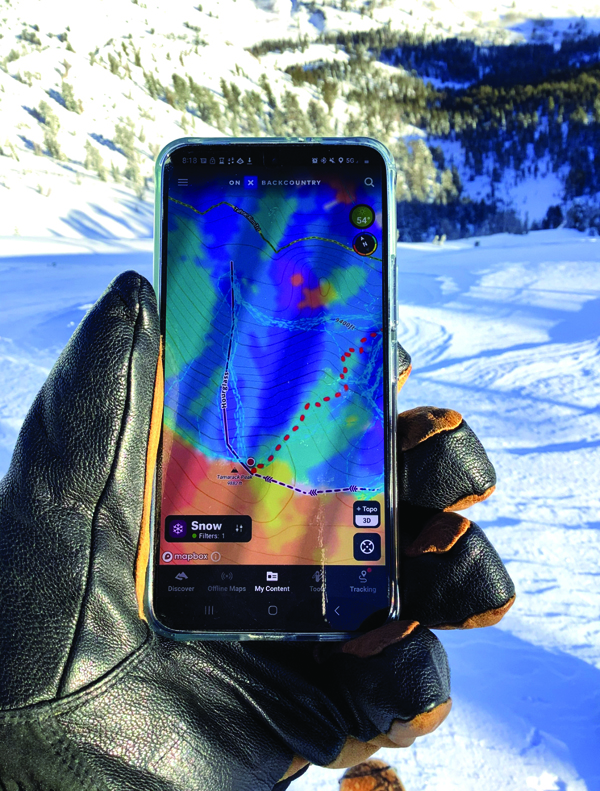
Backcountry mapping apps are a critical tool for exploring, planning and tracking your next adventure. Handheld navigation has evolved from the basics of displaying current location or logging trip distance. Now you can add map layers for aspect and slope angle to help determine a safer approach to an objective. The latest app additions include trip sharing and snow depth to discover new terrain.
With these insightful layers and the ability to glean social beta, today’s mapping apps improve a traveler’s backcountry calculus. And, as with any decision, the more information you have, the better decisions you can make.
In years past, backcountry route planning involved translating the contours of a topographic map. A traveler would estimate the climb and ballpark the travel time (several hours, all day?). Do those bunched lines indicate a rollover, a cliff band or a fun run?
Fast forward to powerful navigation tools in our hands and pockets and a lifetime of routes become more accessible. In recent years, new players such as onX Backcountry and FatMap have joined more established mapping tools like GaiaGPS and CalTopo to create an arms race of features, layers and real-time information integration.
These and other mapping apps offer the basics for free. But spend $30 to $50 for an annual subscription to unlock professional toolkits of information and downloadable maps for offline use. All four apps featured here offer similar capabilities with some bells and whistles that make each unique. Take advantage of free trials to compare what interface and features appeal to you.
The key advantage to next-generation mapping tools revolves around route planning. Instead of plotting lines from point A to point B on a digital map, the snap-to feature wraps a potential route around terrain contours providing a more accurate estimate of distance and travel time.
The key advantage to next-generation mapping tools revolves around route planning. Instead of plotting lines from point A to point B on a digital map, the snap-to feature wraps a potential route around terrain contours providing a more accurate estimate of distance and travel time. Use color-shaded overlays such as slope angle and aspect to avoid tracks below steeper avalanche terrain or slopes that may undergo rapid warming during the day.
American Institute for Avalanche Research & Education (AIARE) instructor Jason Smith with Blackbird Mountain Guides compared several apps on a recent trip to Frog Lake Huts. After pulling up onX and GaiaGPS at different times, he found himself using CalTopo exclusively by the end of the trip. He says CalTopo is a powerful tool that uses high-resolution elevation data.
“It can help you pick out microterrain more readily and help you avoid cliff bands when setting an up track,” he says. “OnX is a great tool for folks just starting to get into maps. And GaiaGPS is a happy medium.”
Chris Rochefort, director of huts, camping, facilities and external events for Truckee Donner Land Trust, likes the vivid, 3D imagery of FatMap. He is also a fan of the avalanche terrain layer.
“It’s detailed and clearly shows where problematic areas are and how to skirt around them,” he says.
This tool highlights in 3D the gradients most likely to cause an avalanche, between 25° and 45º.
In addition to making a day in the backcountry safer, these platforms also help users discover new routes and terrain. On opening the app, onX offers trail suggestions for the immediate area. FatMap features shared trip reports from other adventurers and guidebooks, a collection of must-do routes for specific regions.
There is a deep knowledge base to learn more about the tools and features for each platform. GaiaGPS offers a wealth of articles and blog posts. Check out FatMaps’ YouTube channel or onX’s masterclasses. Smith recommends CalTopo’s Instagram feed for weekly nuggets of tips and info.
Whatever app you choose, buy or print out a paper map and carry a compass because as Rochefort says, “Printed maps don’t run out of battery power.”
“Go out into the mountains with more than one tool. And the most important tool you can use is your brain.”
Mapping apps
CalTopo | $50/year | caltopo.com
FatMap | $31.65/year | fatmap.com
GaiaGPS | $27.99/year | gaiagps.com
onX Backcountry | $29.99/year | onxmaps.com


